PC PoW Lab MinerMine with your PC's CPU and GPU
The app detects compatible devices, lets you choose how much to use and connects your computer to the pool.
1 · InstallOne app, your personal dashboard
The app runs on your PC and opens its dashboard in the browser. No website receives direct access to your hardware.
The installer creates shortcuts. If you prefer not to install, download, extract and open the portable version. Windows may ask you to confirm the first run.
2 · Choose resourcesThe best engine, automatically
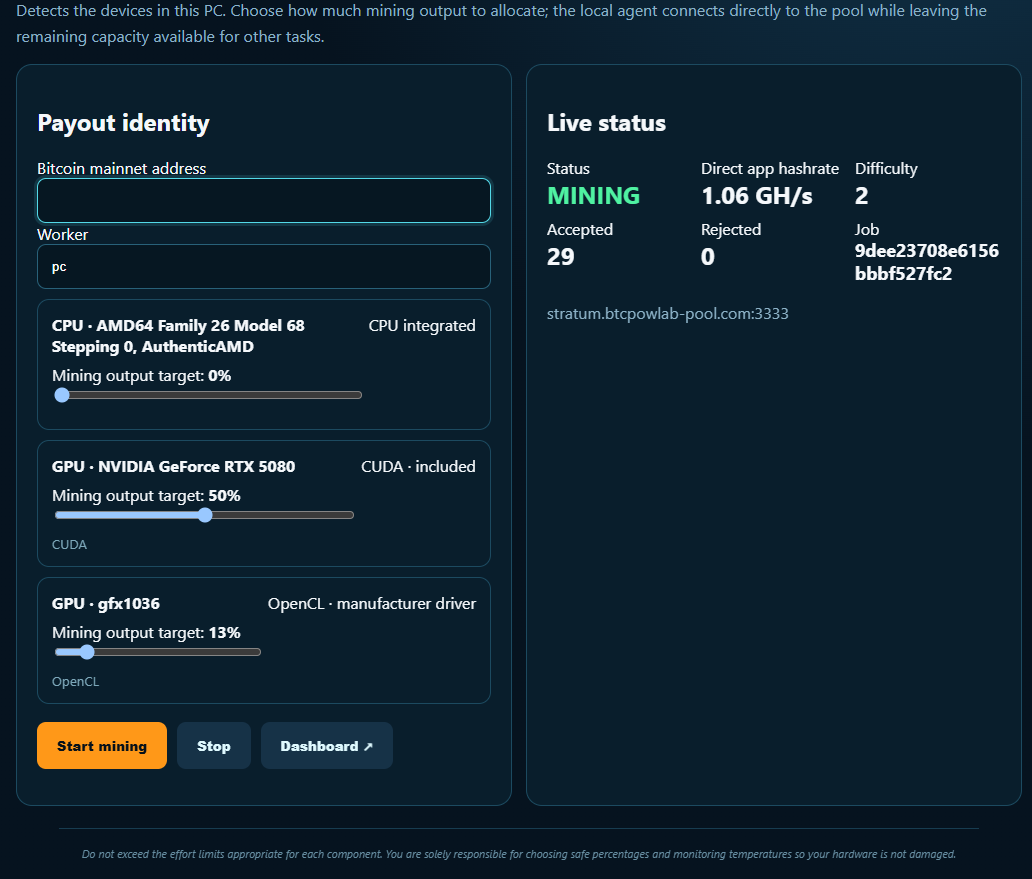
The app uses its included CUDA engine for NVIDIA GPUs and OpenCL for AMD or Intel. You do not need the CUDA Toolkit: an up-to-date official driver is enough. If a driver is missing or fails, the app identifies it clearly and uses an available fallback.
You can assign a different percentage to each device or leave it at 0% to disable it. On NVIDIA, multiple CUDA streams calibrate the control so 50% represents approximately half physical load; Windows' instantaneous reading may fluctuate by a few points.
3 · PayoutYour Bitcoin address
Enter the address where you want to receive rewards and choose a simple name for this PC. The app configures the rest.
4 · DashboardAll your work live
The Dashboard button opens a new window and automatically fills your address when available.
Open dashboard ↗